For professional bookkeepers

Scope QBO cleanups in minutes,
not hours.

Upload your client's QBO exports. Get a prioritized diagnostic with step-by-step fix procedures.

Built for professional bookkeepers. Works with QBO and QBO Accountant. LedgerClean never modifies your client's file.

Full diagnostic in 15 minutes · No credit card required · Free Preview tier after trial

Need just one engagement? Single Cleanup is $29 one-time.

"It got 90% of the issues I found doing the actual review. Love the process steps."

— Jo Christiansen, Professional Bookkeeper

"The step-by-step fix procedures are genuinely excellent. I would use these procedures to train junior staff."

— Carley Martha, CPA/CFE, Success Positive

Built by a bookkeeper

Hi, I'm Kendra. IRS Enrolled Agent, former Intuit QBO Live Lead Bookkeeper, 7+ years of QBO cleanup work. The detection logic and cleanup sequencing come from real cleanup methodology, not theoretical best practices.

More about LedgerClean →

Run LedgerClean first. Layer your expertise on top.

1

See what's wrong

Upload your client's QBO exports and get a health score, prioritized issue list, and estimated cleanup hours. You'll know exactly what you're working with before you start.

Export 6 standard reports from QBO (Trial Balance, Account List, Transaction List, Balance Sheet, P&L, General Ledger). Takes about 10 minutes. Most scans finish in under 5 minutes — you'll have a full diagnostic in 15 minutes total. See the export guide.
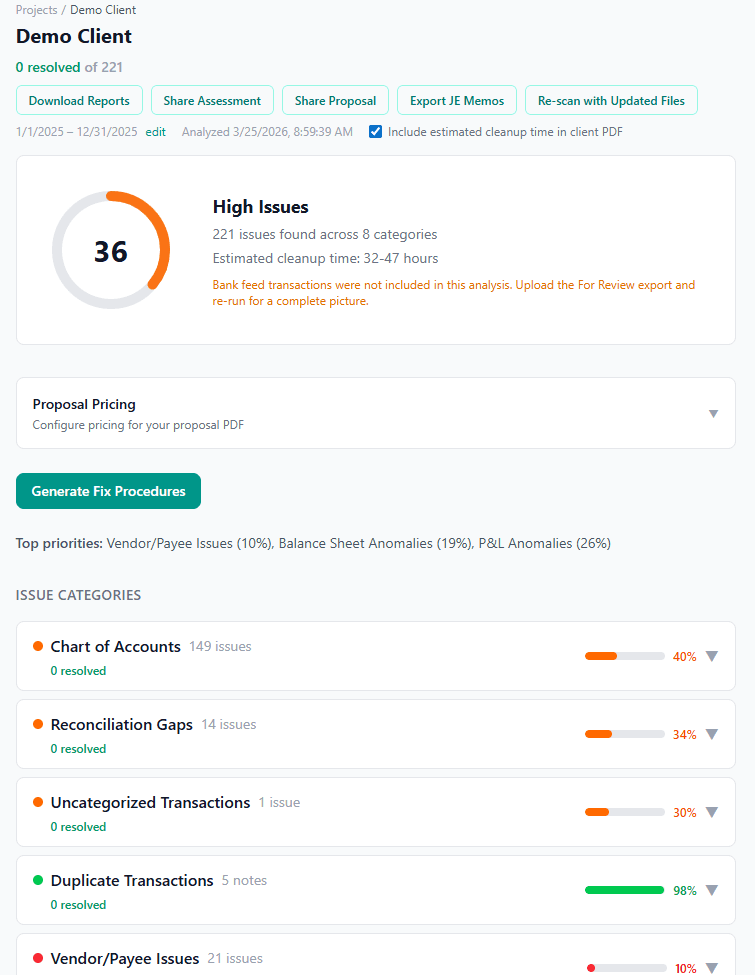
Health score dashboard showing 208 issues across 8 categories with severity scores
2

Work the checklist

Stop asking “where do I even start?” Follow the prioritized cleanup sequence. Each issue has step-by-step fix procedures and draft journal entry memos. Most scans finish in a few minutes. Track your progress as you go.
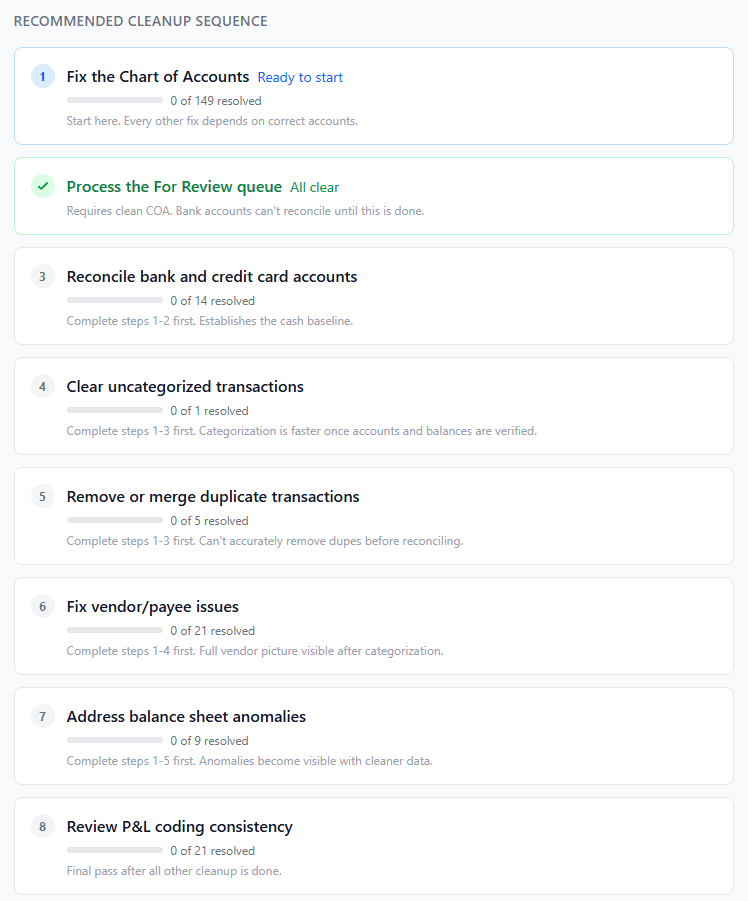
9-step cleanup sequence with progress tracking, dependency notes, and status indicators
3

Share with your client

Export a branded Cleanup Assessment or Proposal PDF. Share a link so your client sees the scope and pricing. Re-scan after fixes to show improvement.
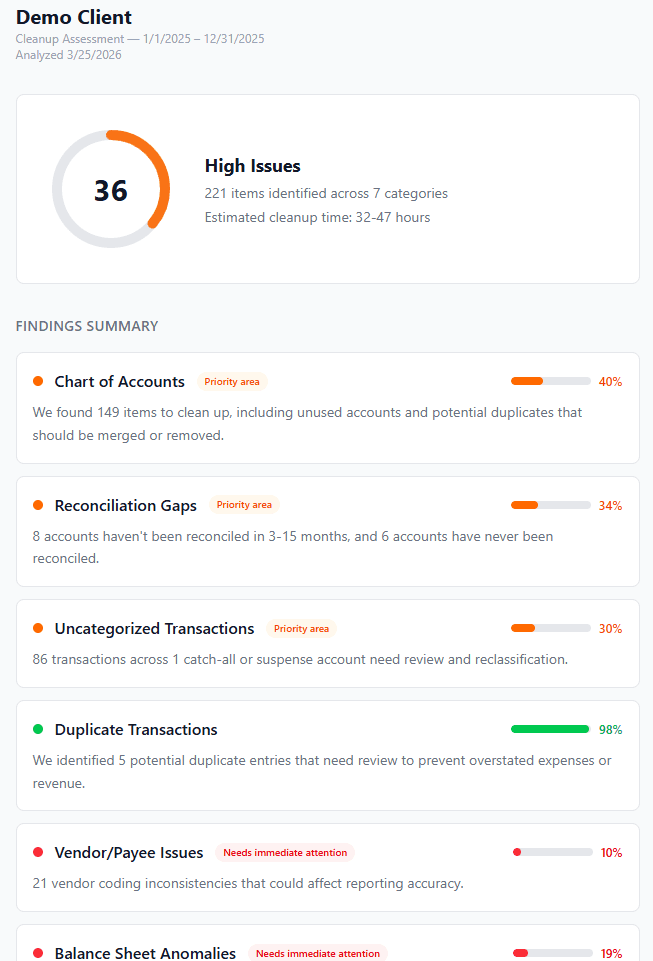
Client-facing cleanup proposal with areas reviewed, itemized pricing, and next steps

Keep books clean month after month

Set up an engagement as a cleanup, monthly maintenance, or both. Group multiple periods under one client and track quality over time.

Health score trend

A line chart showing how the health score changes period to period. Color-coded dots highlight when scores cross into warning or critical zones.

Delta detection

Automatically compare the latest scan to the previous period. See new findings, recurring issues, and what got resolved — no manual diffing.

One-click next month

Hit “Run Next Month” and dates, labels, and client settings are pre-filled. Edit if needed, then upload the new exports and scan.

Estimated monthly hours

LedgerClean estimates recurring bookkeeping hours from actual transaction volume, bank account count, and tracking complexity. Use it to scope monthly engagements or validate existing estimates.

Scoping a new client or a migration? LedgerClean handles that too.

For engagements where the books aren't populated yet — new QBO setups, migrations from Xero, Wave, Sage, or FreshBooks, bank feeds stacked up waiting to be categorized — Rebuild Mode scopes by account from Bank Feed - For Review exports only. Get per-account transaction counts, date ranges, and dollar volumes so you can sequence the work and price the project before you touch a transaction.

How Rebuild Mode works

Each detected issue gets a fix procedure

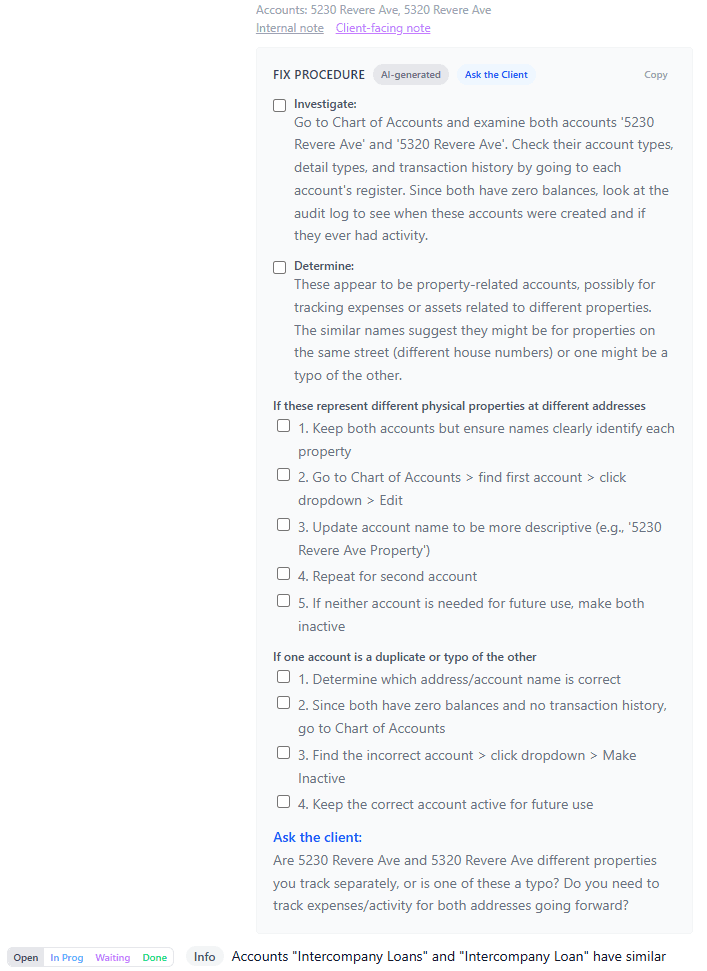
Not just a list of problems — each finding includes step-by-step instructions, conditional checklists based on what you find during investigation, and specific questions to ask the client when source documentation is needed.

Fix procedures are AI-generated from the actual transaction data in the file, so the dollar amounts, account names, and dates are specific to the issue — not generic templates.

Expanded fix procedure showing investigation steps, conditional checklists, and Ask the Client section

What the diagnostic scan catches

Rule-based detection across 8 categories with AI-generated fix procedures. Built from real cleanup methodology to surface common structural issues fast.

01

Chart of Accounts

Duplicate accounts, wrong account types, unused accounts with zero balances, naming inconsistencies, detail type mismatches that break tax mapping.

02

Unprocessed Bank Feed

Transactions sitting in the For Review queue that haven’t been categorized, matched, or excluded. These aren’t in the books yet and they’re invisible on every other report.

03

Uncategorized Transactions

Anything coded to Uncategorized Income, Uncategorized Expense, Ask My Accountant, or other suspense accounts. The bulk of most cleanup work.

04

Duplicate Transactions

Exact and near-match detection on date, amount, and vendor. Flags true duplicates that overstate revenue or expenses, with confidence levels to reduce false positives.

05

Reconciliation Gaps

Accounts that have never been reconciled, months-long reconciliation backlogs, forced reconciliations, and uncleared items older than 90 days.

06

Balance Sheet Anomalies

Negative bank balances, stale Undeposited Funds, Opening Balance Equity with a remaining balance, intercompany accounts that need netting, liability accounts with reversed polarity.

07

Vendor/Payee Issues

Same vendor entered multiple ways, vendors coded to different expense accounts across transactions, blank payee names that weaken the audit trail.

08

P&L Anomalies

Journal entries driving revenue directly, disproportionately large expense lines, month-over-month spikes, work-in-progress billing patterns, basis mismatches across reports.

Run Your First Diagnostic

Full diagnostic in 15 minutes · No credit card required

Is LedgerClean for you?

If any of these sound familiar, you're in the right place.

Solo bookkeeper scoping a cleanup

A new client hands you access and says "my books are a mess." You need to know what you're dealing with before you quote a price or commit to a timeline.

Firm onboarding a new client

Your team needs a consistent way to assess new files, assign cleanup work, and show the client what was wrong and what got fixed.

Accountant cleaning up before tax filing

Tax season is coming and the books aren't ready. You need to find the problems fast, fix what matters for the return, and document what you did.

Your client's data is protected

LedgerClean is read-only.

It analyzes your client's data and tells you what's wrong. It will never create, edit, or delete anything in their books. Nothing to undo. Nothing that can go wrong in your client's file.

Files deleted after processing

Uploaded QBO exports are parsed, analyzed, and then deleted. We store the diagnostic results, not your client's raw financial data.

Structured PII stripped before AI analysis

SSNs, EINs, bank account numbers, email addresses, phone numbers, and physical addresses are removed before anything is sent to the AI. Vendor and customer names are sent because the AI needs them to generate relevant fix procedures. Your client's business name is replaced with a generic label.

Encrypted at rest and in transit

All data is encrypted with TLS in transit and AES at rest. Row-level security ensures you can only access your own engagements.

No data sold or shared

We don't sell data, share it with advertisers, or use it for AI model training. Anthropic's commercial API terms prohibit training on API data.

Full details in our Privacy Policy.

Common Questions

Does LedgerClean modify my client's file?

No. LedgerClean is read-only. It analyzes exported QBO reports and tells you what's wrong. It never creates, edits, or deletes anything in your client's books. Nothing to undo.

Does it work with QBO Accountant?

Yes. QBOA and QBO direct exports are structurally identical. Export the reports from your client's file through QBOA and upload them. Same process, same results.

How long does a scan take?

Most scans finish in under 5 minutes. Exporting the 6 reports from QBO takes about 10 minutes, so you can have a full diagnostic in 15 minutes total.

Can I use it for ongoing monthly bookkeeping, not just one-time cleanups?

Yes. Group multiple periods under one client and run a scan each month. LedgerClean tracks the health score over time and shows you exactly what changed — new issues, recurring problems, and resolved findings — so you can catch drift before it becomes a cleanup engagement.

What happens after the free trial?

If you don't add a payment method before the 14 days end, your account drops to the Free Preview tier. No charge, no surprises. Your engagements stay in your account and you can still run 3 diagnostic scans per calendar month. Same thing if you cancel a paid plan later.

More questions? See the full FAQ on the pricing page.

See the issues before you quote a price.

Start a 14-day free trial of Solo or Firm with full access. No credit card required. Pick your plan on the next page.